
Awards
Motivation is key to student success. Ilmiya’s Awards feature provides a structured system to recognize achievements, positive behavior, and consistent effort — encouraging engagement, goal-setting, and continuous growth.
Class-Level Awards List
Section titled “Class-Level Awards List”Before drilling into an individual student, a class-wide list shows the same four categories — Points, Trophies, Badges, Rewards — across everyone at once.
- Grid/List view toggle — switch between a card-based grid layout and a traditional table layout for browsing the whole class at once
- Archived students toggle — hide or show students who’ve been archived (excluded by default), same pattern as Grades
- Class filter and search — narrow the list to one class, or search for a specific student by name
- Sortable columns — and notably, the columns themselves change depending on which tab you’re on: the Badge column setup differs from the Trophies view, which differs again from Points/Rewards — each tab genuinely reshapes the table to fit what it’s displaying, not just filtering the same fixed columns
- Quick-assign behavior shortcut — a button on the class list header opens the reward/behavior-assignment tool directly, without needing to open an individual student’s profile first
- Date range filter — scopes whichever tab you’re viewing: on Points it scopes the chart, stat cards, and points table; the same applies per-tab for Trophies, Badges, and Rewards
- Export as image — tab-aware: exporting from Points saves a points-named image, Trophies saves a differently-named trophy image, and so on for Badges and Rewards
Individual Student Awards Page
Section titled “Individual Student Awards Page”Clicking into a student opens their own Awards page, broken into the same four tabs — Points, Trophies, Badges, and Rewards. The same date range filter and tab-aware export as image button from the class list above apply here too, scoped to whichever tab is open.
How the Awards System Works
Section titled “How the Awards System Works”Points
Section titled “Points”Track student progress and engagement by awarding points for completing questions and activities. Key metrics like total XP and progress indicators help both teachers and students monitor development over time.
Answer a question correctly, for the first time → +1 point (some questions are worth more)Answer incorrectly → 0 points for that questionAnswer a question you already got right, again → no extra point — never duplicated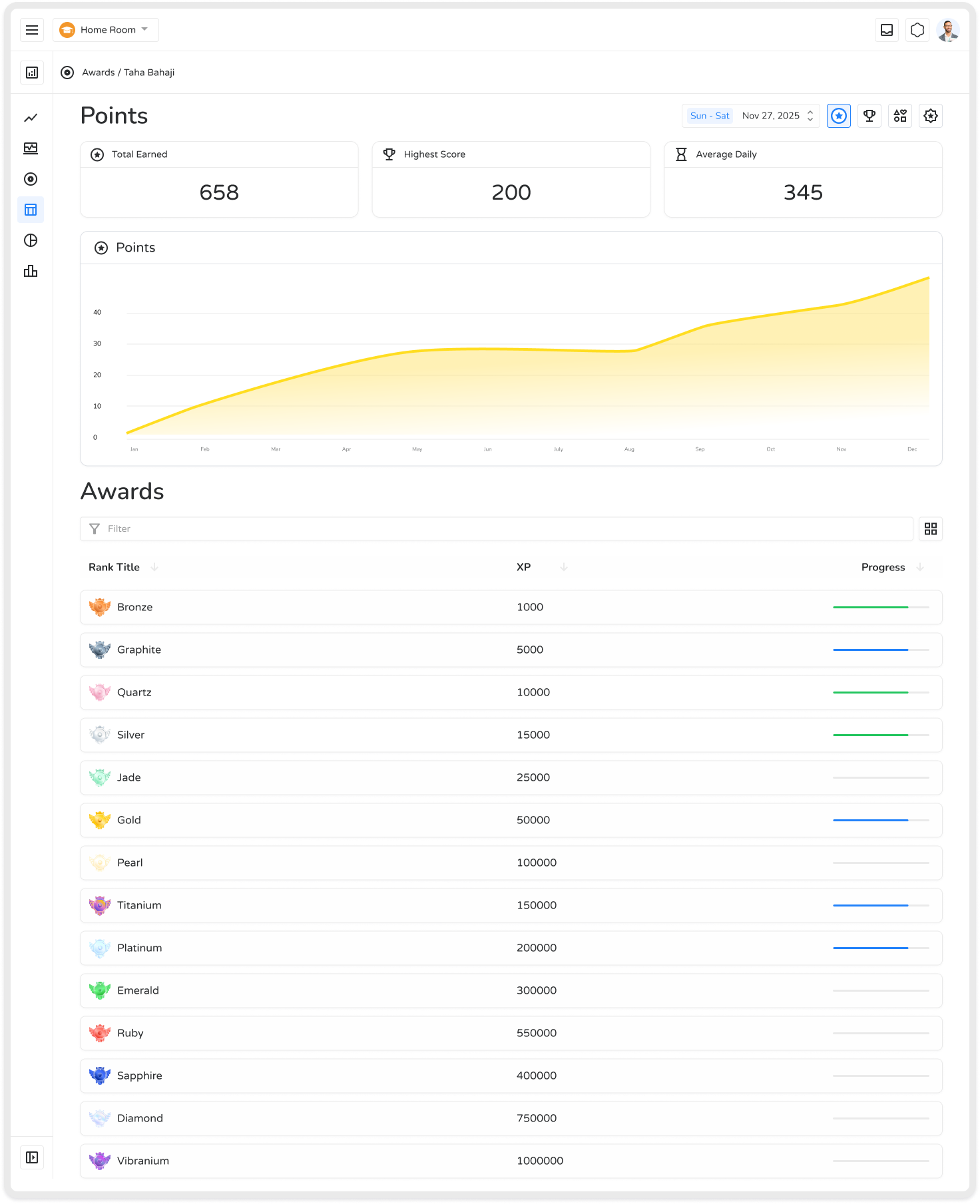
Beyond the running point total, the Points tab shows:
- A cumulative chart plotted over time — a line/area chart of how the student’s points have grown day by day across the selected date range, so you can see whether their earning pace is steady, accelerating, or has stalled recently
- Three summary stat cards: Total Earned (sum across the range), Highest Score (their single best-performing day or session), and Average Daily (a rough daily earning rate)
- Search and sort on the underlying points table, so you can find a specific entry or reorder by amount/date rather than scrolling chronologically
Trophies
Section titled “Trophies”Celebrate achievements across subjects with tiered awards — from Bronze to Platinum. Trophies highlight dedication, motivate learners to progress, and provide a visual representation of academic accomplishments. Unlike badges, a trophy reflects the accuracy on a single quiz, not an all-time total:
Accuracy on this quiz = 100% → Platinum trophyAccuracy ≥ 85% → Gold trophyAccuracy ≥ 70% → Silver trophyAccuracy below 70% → Bronze trophy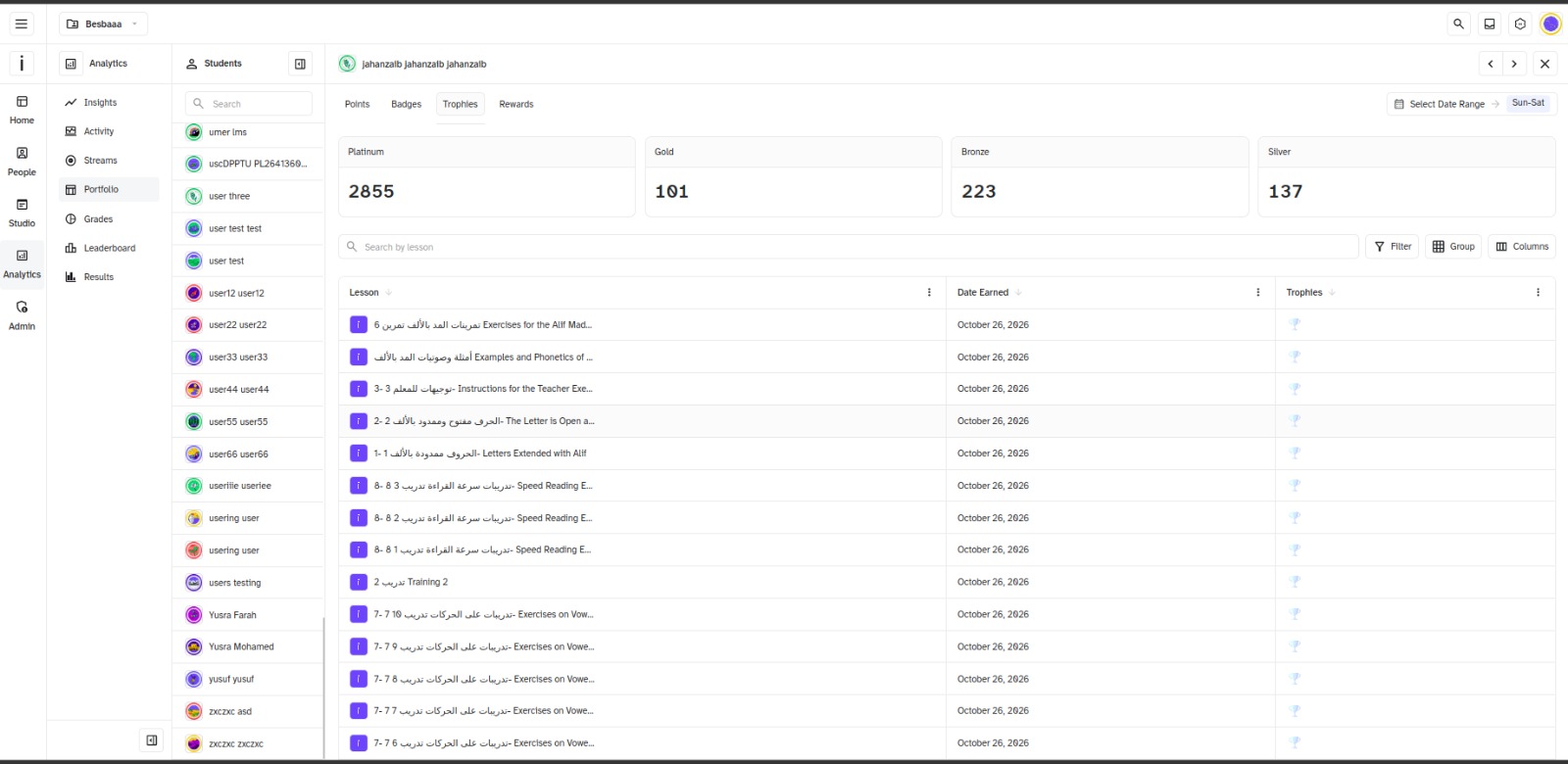
Rather than just a trophy count, there’s a full table listing every individual trophy the student has earned, one row per trophy, showing:
- The lesson name the trophy was earned on
- The date it was earned
- The trophy icon (Bronze/Silver/Gold/Platinum) for that specific attempt
Badges
Section titled “Badges”Gamified badges capture milestones and long-term growth. As students earn points, they advance through 14 tiers, each with 10 levels — 140 badge levels in total, unlocked automatically once a student’s point total crosses each threshold:
| Tier | Coin threshold |
|---|---|
| Bronze | 1,000 |
| Graphite | 5,000 |
| Quartz | 10,000 |
| Silver | 15,000 |
| Jade | 25,000 |
| Gold | 50,000 |
| Pearl | 100,000 |
| Titanium | 150,000 |
| Platinum | 200,000 |
| Emerald | 300,000 |
| Sapphire | 400,000 |
| Ruby | 550,000 |
| Diamond | 750,000 |
| Vibranium | 1,000,000 |
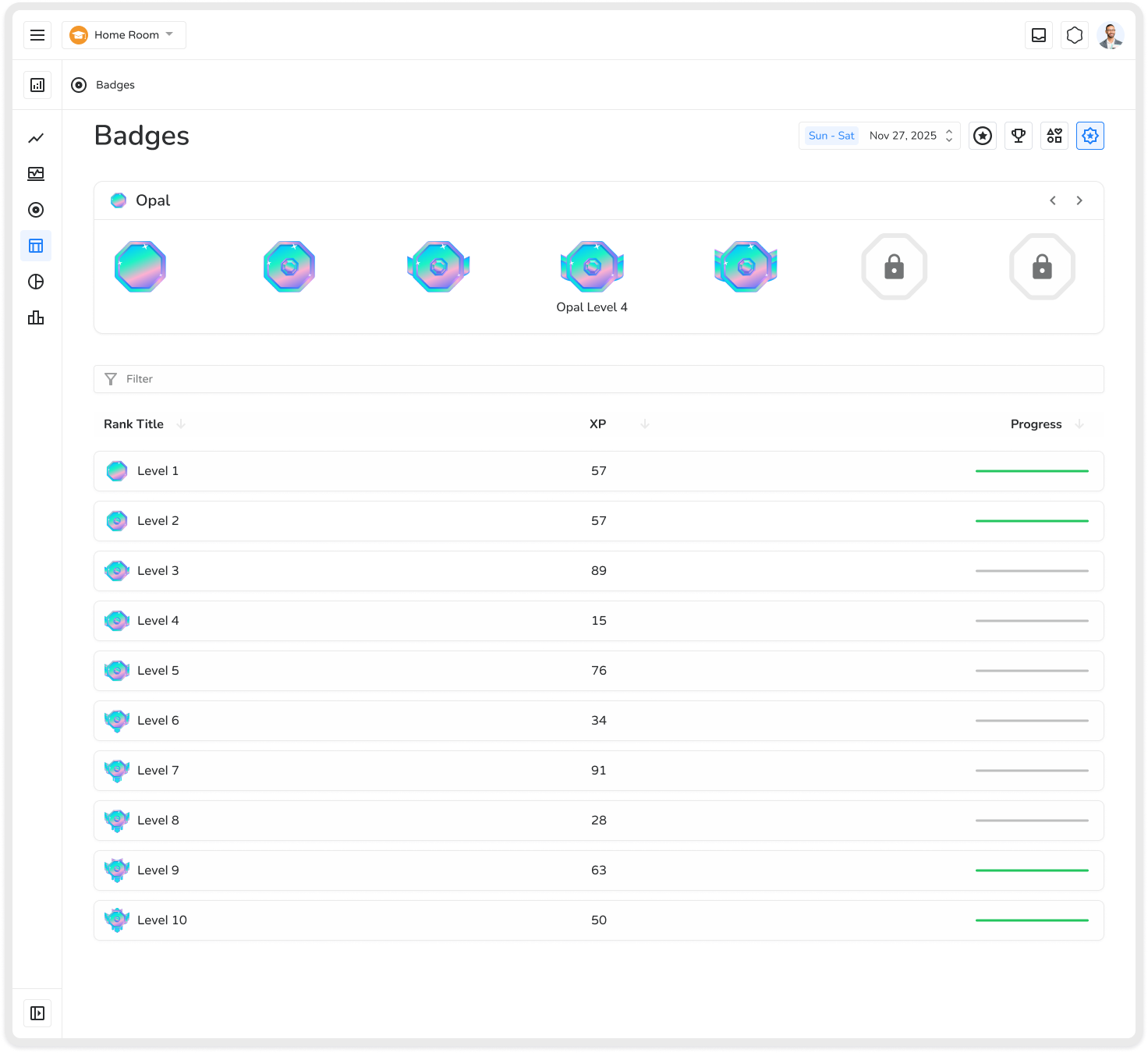
- Search by badge name or level — useful once a student has progressed through many of the 140 possible badge levels, so you don’t have to scroll through the whole progression to find where they currently stand
- A carousel-style selector for browsing badge/trophy tiers visually — a horizontal scroller of badge icons in sequence, letting you flip through tiers to see what’s already earned versus what’s still ahead, rather than reading a plain list
Rewards (Behavior Analysis)
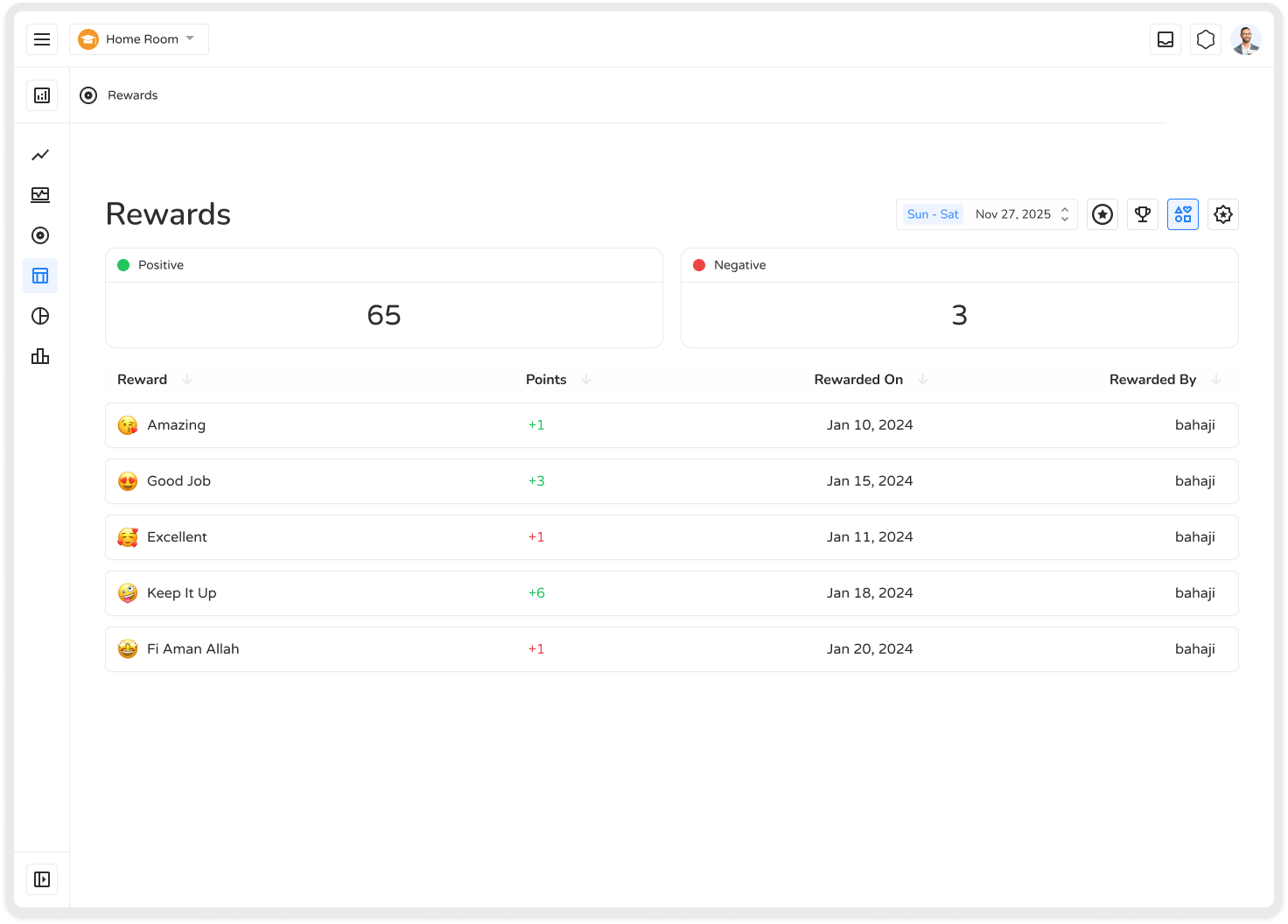
Section titled “Rewards (Behavior Analysis)”Track and promote positive behavior using interactive charts and detailed feedback. This is entirely manual — nothing here is detected automatically. Teachers can:
- Assign a behaviour (e.g. “Helped a classmate,” worth +2 points) to a student or class — points post to that student’s record immediately
- Monitor behavior over time
- Provide personalized guidance
- Help students understand their strengths and areas for improvement
Benefits
Section titled “Benefits”| Benefit | Description |
|---|---|
| Enhances Motivation | Recognizes academic and behavioral achievements, keeping students engaged |
| Encourages Goal-Setting | Tiered rewards provide clear objectives from Bronze to Platinum |
| Visualizes Progress | Badges, points, and trophies offer an easy-to-see record of accomplishments |
| Improves Feedback | Teachers can provide personalized, actionable recognition |
| Builds Responsibility | Students learn how their actions impact their progress and outcomes |
| Promotes Healthy Competition | Gamified rewards inspire effort, engagement, and peer motivation |
| Supports Long-Term Growth | Continuous recognition encourages consistent learning habits and mastery |
The Ilmiya Awards system transforms achievement recognition into a dynamic, motivating, and growth-oriented experience — helping students stay engaged, improve performance, and develop both academically and behaviorally.
Loading Markdown…
Markdown could not load. or open the raw file.